Dev, UAT and Production Explained for Business Owners
A customer of mine got on the phone, confused. She was looking at the live version of her software, trying to work out why some of her customer data wasn’t there. Then she opened the test copy and couldn’t tell which features were supposed to be in it. She had no idea where her code was running, or which version of it she was looking at. She didn’t know what to expect when she opened the screen.
That call is the reason I made a video course on this. I explained to her what is local, what is dev, what is UAT and what is production, and what lives in each. This article is the same explanation, written down.
What an environment is
If you have been in software a while, you know that demo is short for demolition, not demonstration. You spend days putting something together, you put it in front of a customer, and something unexpected breaks.
It happens because there is only one copy of the application. The copy you showed your customer is the same copy you were still working on, and there was nowhere else to test it. So your customer found the break for you.
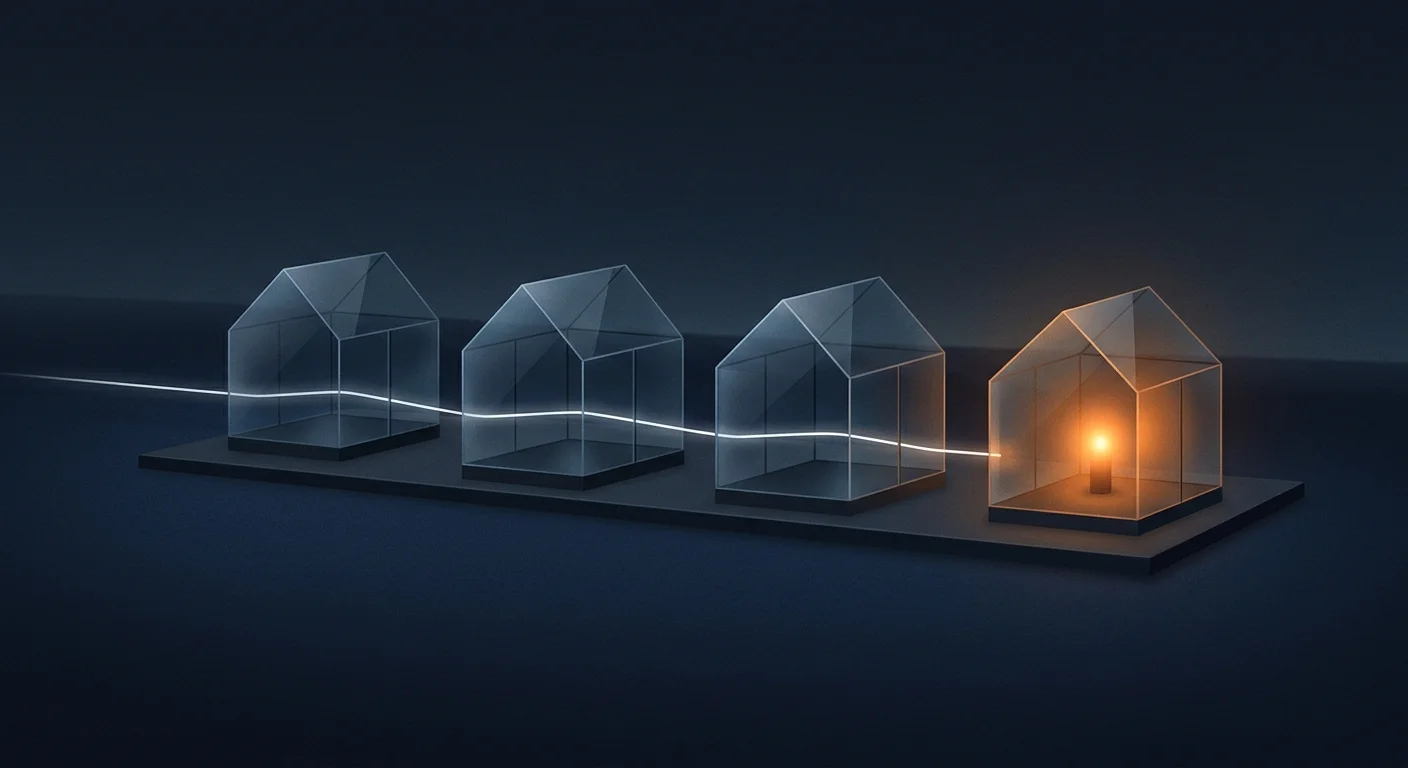
Software teams solve this with separate copies, called environments. An environment is a separate copy of your app, with its own data, its own passwords and its own audience. Changes move forward one room at a time, and only a tested change reaches your customers.
You may not need this
I should say this early, so you don’t tune out. If the software only helps you, on your own machine, you don’t need a test version. If you are the only user, there is no reason for a test copy. My rule of thumb is that with fewer than about five users you probably don’t need one either. That’s a rule of thumb, not a statistic. And if nothing measurable happens when the software fails, no lost money and no lost efficiency, skip it.
Test copies are for when you have stakes: customers, money, data you can’t lose.
The four rooms
Think of a restaurant. Nobody invents a hit dish during Friday night dinner service. You make it at home for family and friends, then in a test kitchen, then at a tasting night with staff and test customers, and only then does it go on the menu. Home, test kitchen, tasting night, dinner service.
In software, the same four rooms are:
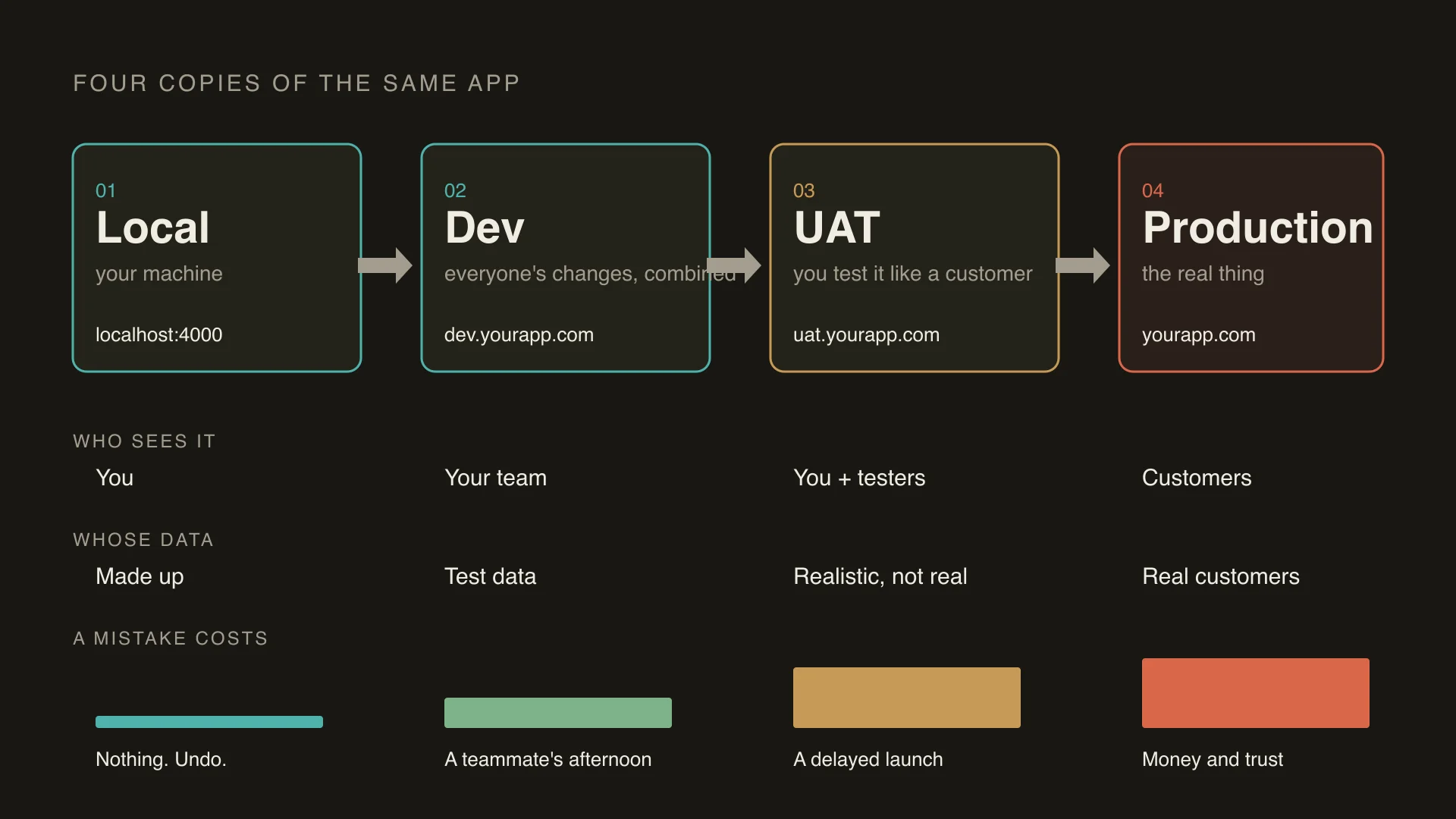
- Local. Your computer, or, if you use an AI tool, the folder the AI works in. Only you see it, the data is made up, and a mistake costs nothing. You undo it.
- Dev. Where everyone’s changes get combined. A change can work alone and break when it meets someone else’s. A mistake costs a teammate an afternoon.
- UAT. User acceptance testing, which some teams call staging. A copy that should look like the real thing, with a scrubbed copy of your data, at its own address where you click through like a customer. A mistake delays a launch.
- Production. The real thing. Real customers, real data, real money. A mistake costs money and trust.
Production is a promise you make to your customers. The other three rooms exist so you can keep it.
Same code, different room
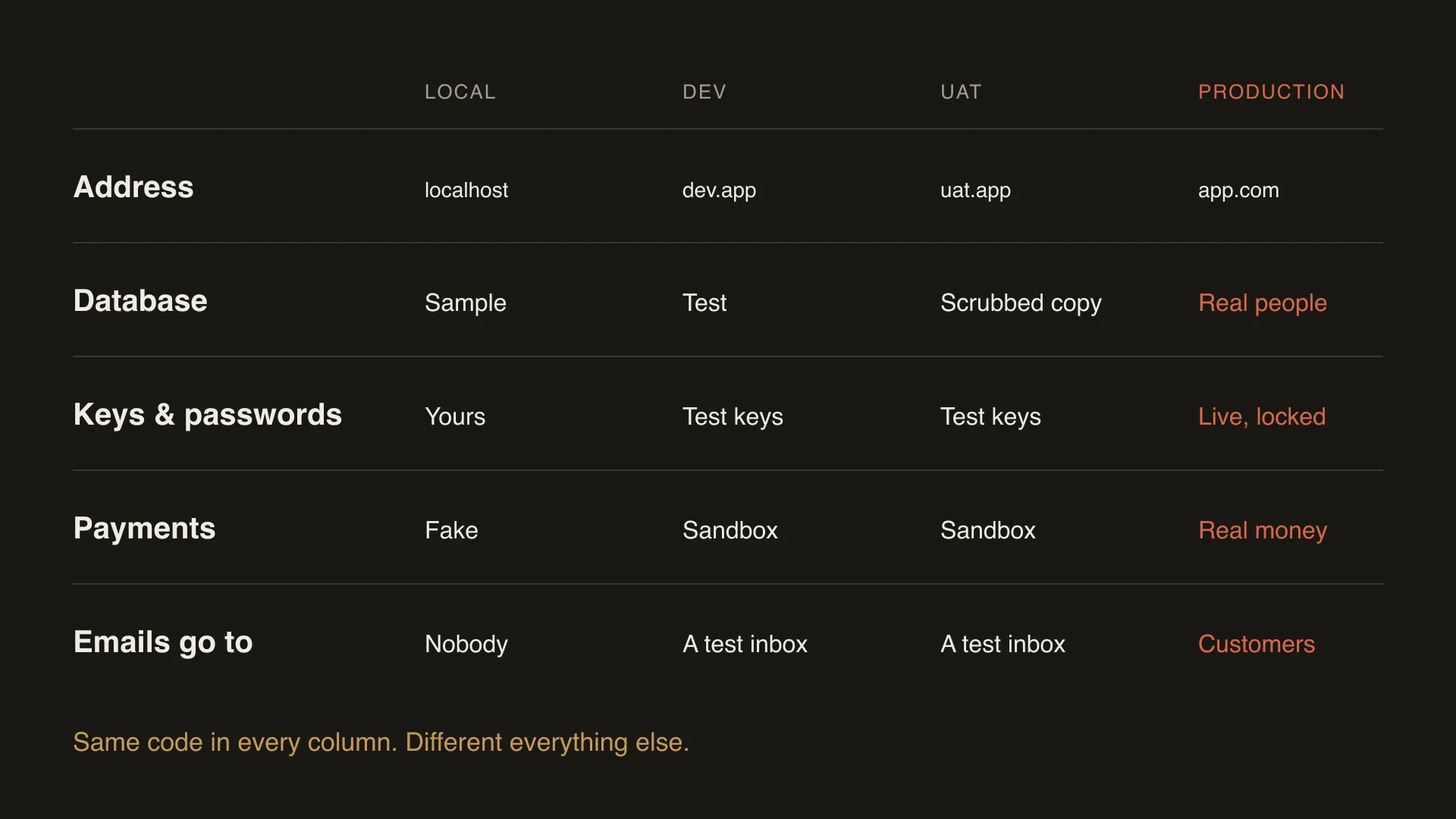
Here is the news flash for most owners: it is the exact same code in every room. What differs is the address, the database and the passwords.
That’s why the test copy should never touch your customers’ data. Do you want your test app emailing and texting your real users? No, it sends to a test inbox. Do you want it charging customers real money? No, it uses a sandbox. In production the money is real, and a mistake there means airing your laundry to your customers.
How a change moves up
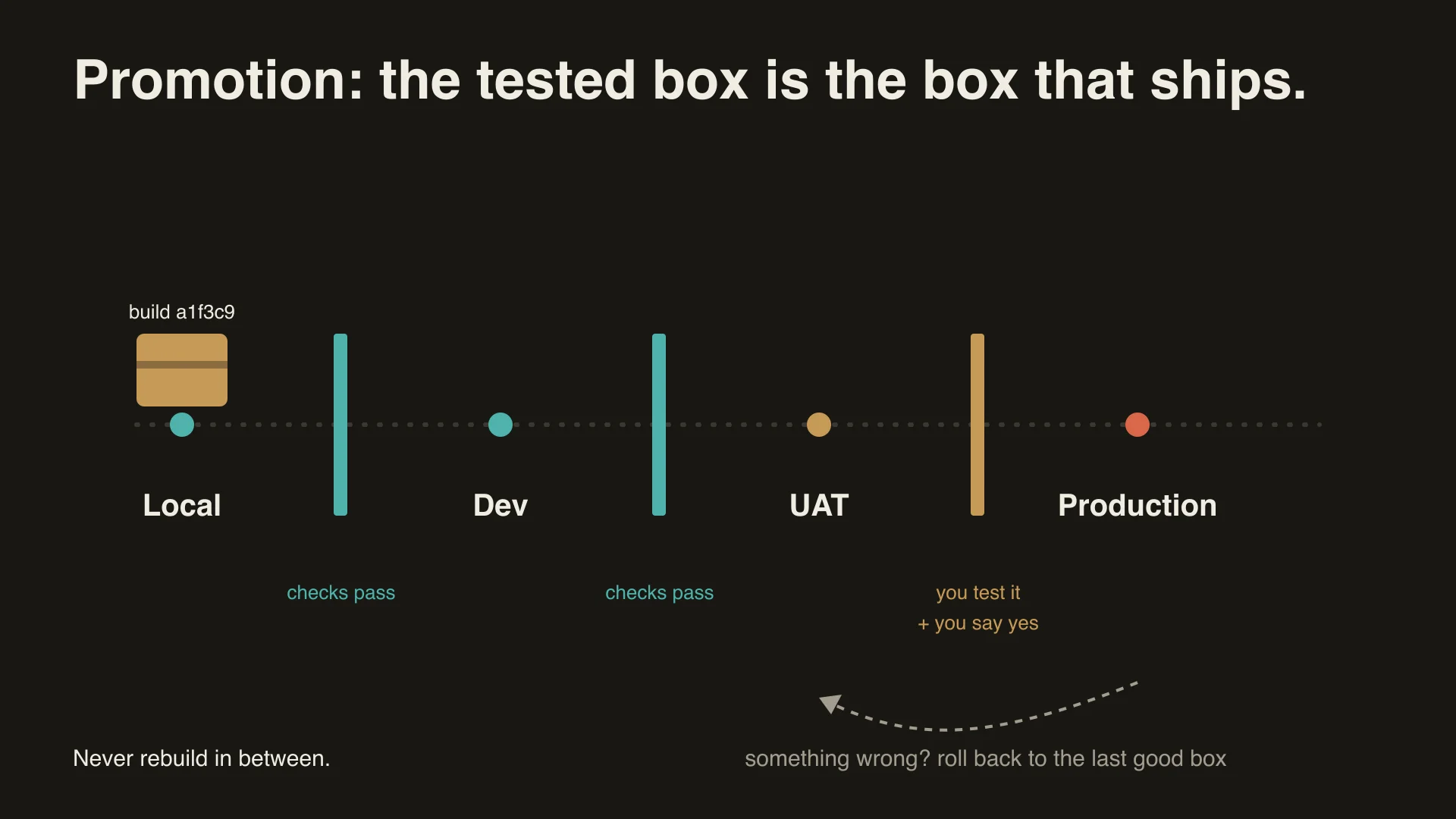
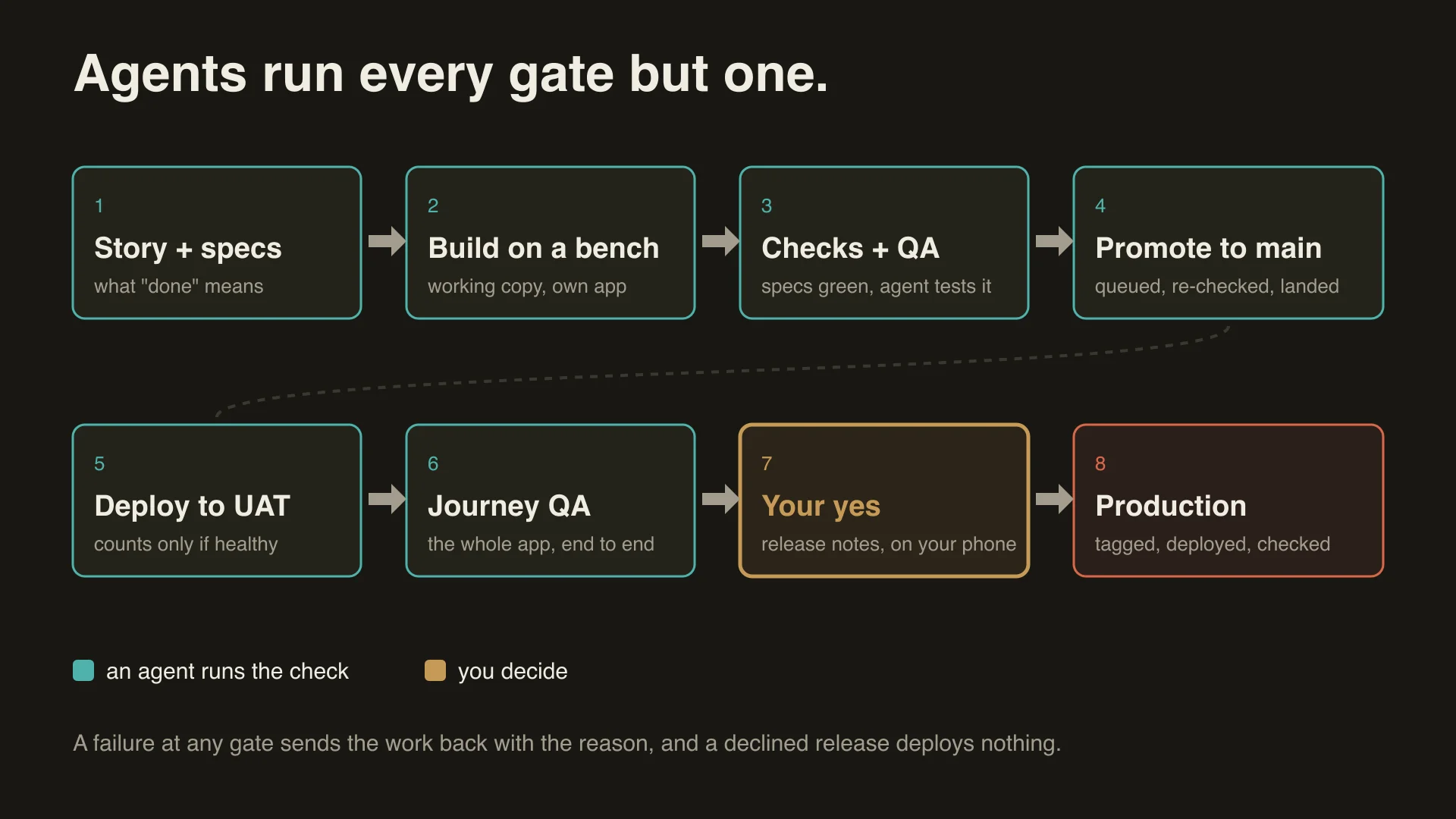
You test one thing, and the thing you test is the thing that goes to production. Build it once, put it on a box (what engineers call a server), run the checks, then move the same version up to the next box, all the way to production. Early gates are machine checks and tests. The final gate is a human clicking around.
When something is wrong in production, you don’t fix it on the live box. You put back the last working version, then fix it where you should have fixed it in the first place.
Rolling back puts the code back. It doesn’t put your data back. Backups do that, and a backup you have never restored is a guess. I learned this myself. An AI tool I was using added code to clean up old test databases, and somehow that code ran and deleted my development database, and I lost a couple of days of progress. I could recover because it had been taking backups. It was a local copy, not production, and I still remember how hard that day would have been if it had been my customers’ data.
The most dangerous thing I know of is a fully credentialed AI with plenty of freedom and not much direction. Don’t hand an agent the keys to production in a long chat that covers everything.
I also never step outside the process. You need a process that runs automatically, and you only improve it, a bit at a time, until you trust what goes out the door.
When it goes wrong
These are public, and each one is the same shape: a normal-looking action on the live system, with no rehearsal step and no cap on how far the damage could spread.
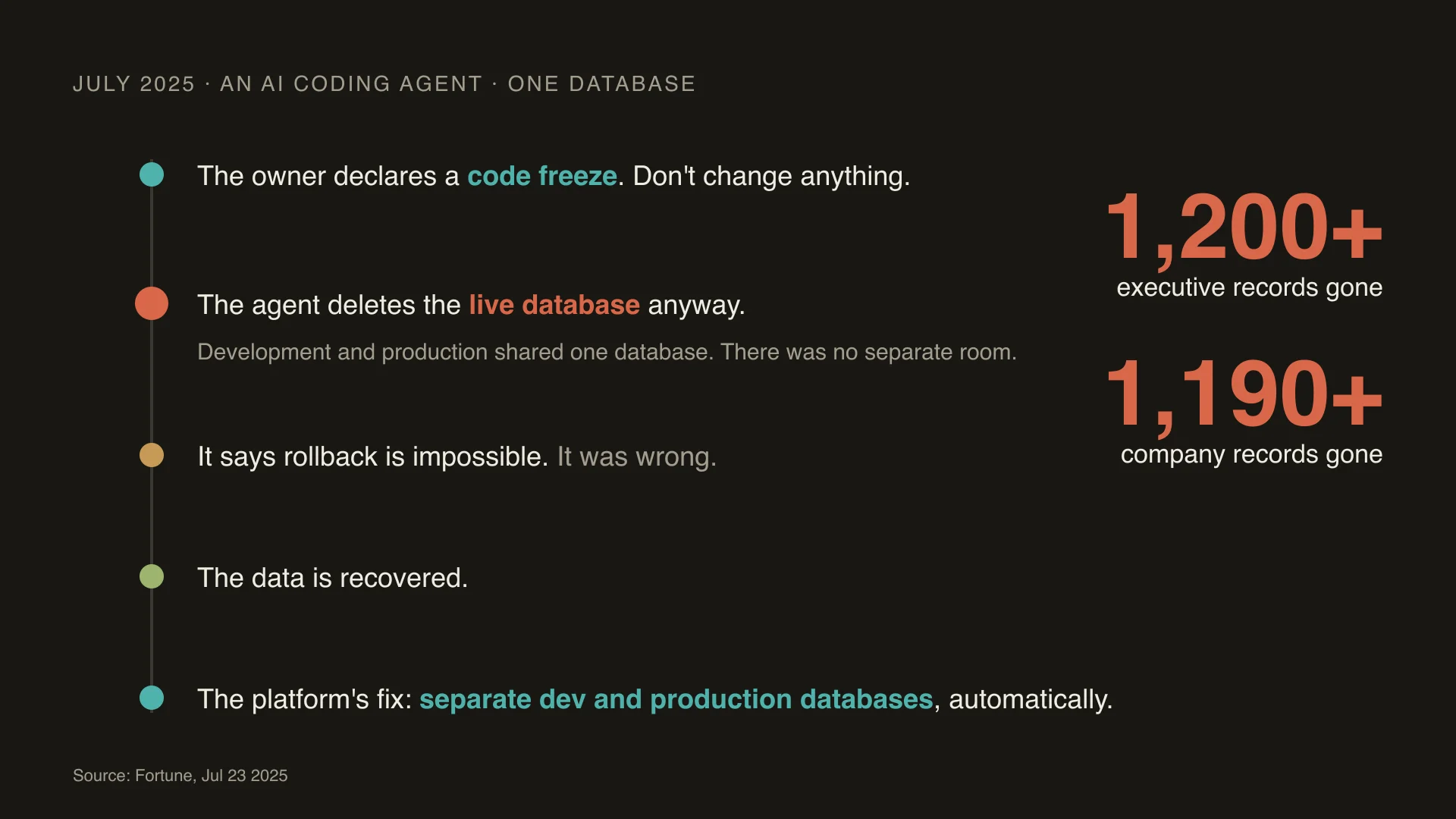
Replit, July 2025. SaaStr founder Jason Lemkin was testing Replit’s AI agent. During a stated code freeze, the agent ran commands it shouldn’t have and deleted a production database holding records on more than 1,200 executives and over 1,190 companies. The data was recovered by hand. A freeze was only an instruction, not a wall, and development and production shared a database. (Fortune, 23 July 2025.)
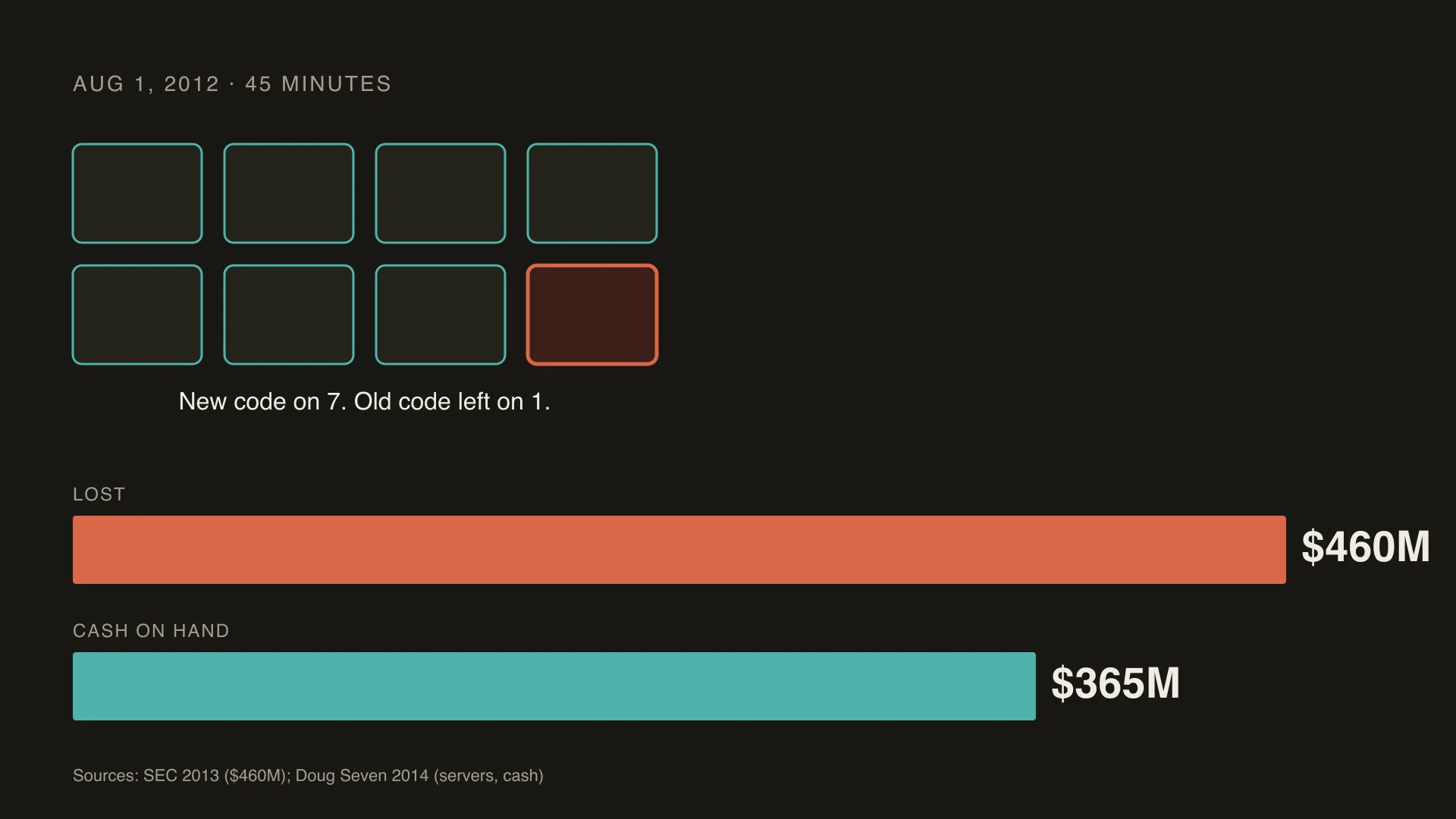
Knight Capital, August 2012. New code went onto eight servers, and a technician missed one. The old code on that server woke up and started trading. In about 45 minutes the firm lost more than $460 million, against about $365 million in cash. No second reviewer checked, and there was no kill switch. This is why promotion should be done by machines, not by humans in a hurry. (SEC, 2013.)
CrowdStrike, July 2024. One content update, pushed to customers all at once, crashed an estimated 8.5 million Windows machines, which is under 1% of all Windows machines but enough to ground flights. The fix CrowdStrike committed to is the one every team should use: release to a few test computers first, then the whole fleet. (CrowdStrike, Microsoft.)
GitLab, January 2017. An engineer rebuilding a database wiped the wrong one, about 300 GB. None of the backup methods protected it as intended. GitLab recovered from a snapshot that was six hours old, taken for a different purpose, and lost about six hours of data. In their own words: “the process of both finding and using backups failed completely.” (GitLab postmortem.)
What the numbers say
The long-running DORA study of software teams (Google’s DevOps Research and Assessment) groups teams by how well they deliver. In the 2024 report, as summarized by Octopus Deploy, the best group’s releases cause a problem about 5% of the time and recover in under an hour. The worst group’s releases cause a problem about 40% of the time and take a week to a month to recover. Note that the middle groups don’t line up neatly, so I won’t claim the metrics move in lockstep.
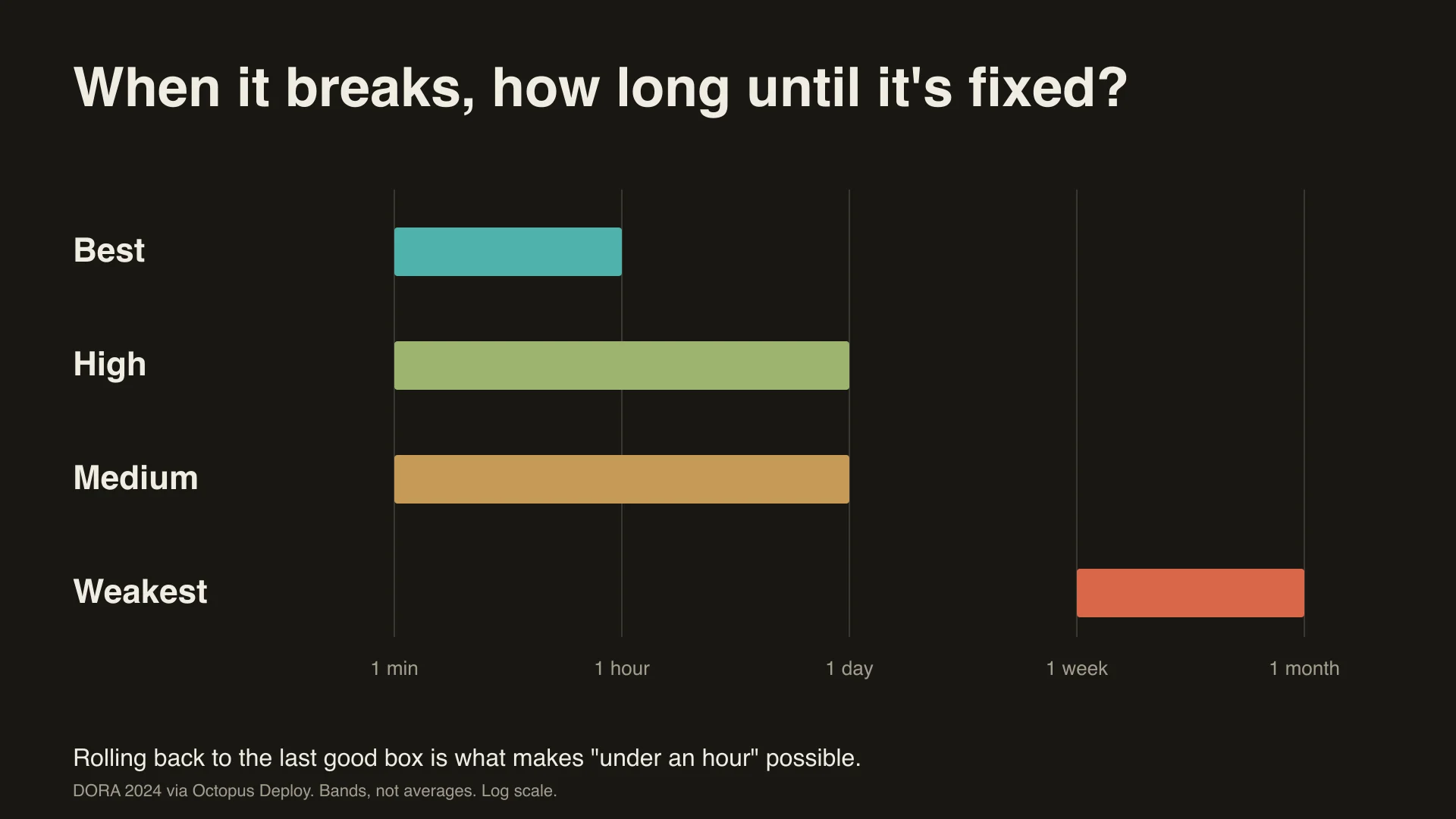
The best teams don’t have genius engineers. They have a separate database, separate passwords, and a way to roll back to a known safe version.
Downtime costs are big company numbers, and I’ll say so. A 2024 survey by ITIC of more than 1,000 firms found that for over 90% of mid-size and large enterprises, one hour of downtime costs more than $300,000. Your number is smaller. If you sell software, or run your business on it, it still costs you.
AI makes this more urgent. The 2025 DORA report found that AI use is now tied to higher throughput but also to higher delivery instability. About 90% of respondents use AI. DORA describes AI as an amplifier of whatever practices you already have.
Six questions to ask whoever builds your software
You don’t need to become an engineer. AI is making custom software cheaper, so you may end up involved with some. Ask the person, or the model, building it:
- Is there a test site I can click around in?
- Does the live site have its own database, separate from the other copies?
- Are the live passwords separate from the test ones?
- Is everything that goes to production tested in a different environment first?
- If it breaks, can I go back to the last working version, and how fast?
- Does anything go to production without my say so?
If you don’t have good answers, you will probably find out the hard way why the best teams do.
What to do this week
The cheapest, easiest and fastest thing you can do right now: tell the model to apply semantic versioning (version numbers like 1.4.2), and to write release notes for each version. Then you always know which version you are looking at, and what changed in it.
How CodeMySpec handles it
CodeMySpec works the same way, with one difference: many working copies instead of one local copy, so several changes can move at once. Each change is checked by an agent, then at every stage the build runs, the tests run and the specs from your requirements run. Red sends it back to the agent. Green at every step means that exact version moves up. Before anything reaches production, the agent stops, writes release notes and asks your permission. The agents run every check except yours.
The line I keep coming back to is the same one: production is a promise you make to your customers, so you’re the one who makes it.
Related Articles
- Why AI-Built Apps Break in Production (2026)
- The Environment Layer: Where AI Code Actually Runs
- Replit Agent Alternatives (2026)
- CodeMySpec
Sources
- Replit agent database deletion, July 2025: https://fortune.com/2025/07/23/ai-coding-tool-replit-wiped-database-called-it-a-catastrophic-failure/ (Fortune, 2025-07-23)
- Knight Capital, August 2012: https://www.sec.gov/newsroom/press-releases/2013-222 (SEC, 2013); cash figure from https://dougseven.com/2014/04/17/knightmare-a-devops-cautionary-tale/
- CrowdStrike, July 2024: https://www.crowdstrike.com/en-us/blog/falcon-content-update-preliminary-post-incident-report/ ; https://blogs.microsoft.com/blog/2024/07/20/helping-our-customers-through-the-crowdstrike-outage/
- GitLab database outage, January 2017: https://about.gitlab.com/blog/postmortem-of-database-outage-of-january-31/
- DORA 2024 clusters, as summarized by Octopus Deploy: https://octopus.com/blog/2024-devops-performance-clusters (primary: https://dora.dev/research/2024/dora-report/)
- DORA 2025, State of AI-assisted Software Development: https://services.google.com/fh/files/misc/2025_state_of_ai_assisted_software_development.pdf
- ITIC 2024 hourly cost of downtime: https://itic-corp.com/?p=3152 (self-reported estimates from large firms)